Drag Drive Simulator Private Server Guide & Tips 2026
Looking for a Drag Drive Simulator private server? Learn how to optimize your gameplay, redeem the latest codes, and master the new wheelie system today.
Published: Drag Drive Simulator Wiki Editorial Team
Table of Contents
Master the Roads in Drag Drive Simulator
Are you looking to dominate the streets of the latest update? Whether you are a casual cruiser or a competitive racer, understanding how to utilize a Drag Drive Simulator private server can significantly enhance your experience. In this guide, we dive deep into the mechanics of this popular Roblox title, ensuring you have the edge needed to master the new wheelie style and climb the leaderboards.
Finding a dedicated environment to practice your driving skills without the chaos of a public lobby is essential for high-level play. If you have been searching for a Drag Drive Simulator private server to host private meetups or practice your custom modifications, knowing how to navigate the game’s infrastructure is your first step toward becoming a professional freestyler.
Why You Need a Private Server for Practice
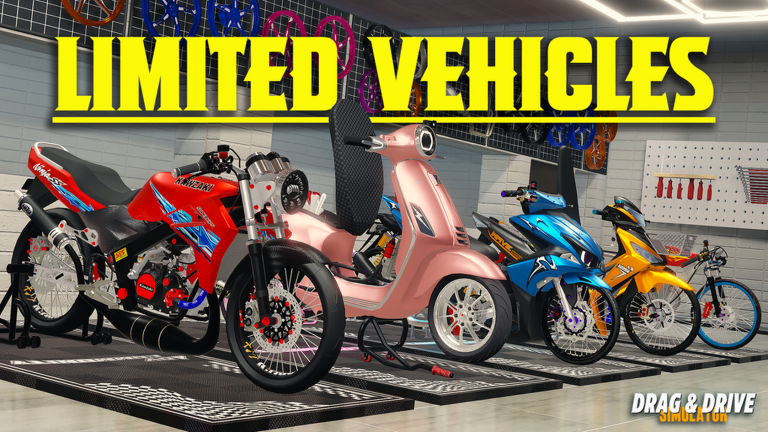
Public servers are vibrant and full of interaction, but they can be distracting when you are trying to perfect your engine tuning or master the new physics. By using a private server, you gain full control over the environment. This is particularly important for players looking to experiment with the new 360-degree action camera or testing out the performance of the latest limited-edition vehicles without interference.
Benefits of Private Hosting
Zero Lag Environment: Reduced player count often leads to smoother frame rates.
Perfect for Content Creation: Capture high-quality footage for social media without random players driving into your shots.
Custom Training: Focus on the "Wheelie Style" trick system in peace.
Organized Meetups: Host roleplay events with friends without outsiders disrupting the flow.
Feature
Public Server
Private Server
Player Density
High
Controlled
Performance
Variable
Stable
Roleplay Control
Limited
Full
Trick Practice
Difficult
Ideal
Mastering the New Wheelie Style Update
The latest BETA V1.1.9 update has completely overhauled the riding experience. With the introduction of the Special Trick System, players are now expected to tune their motorcycles for specific angles and speeds.
How to Improve Your Wheelie Performance
Select the Right Bike: Not all motorcycles respond the same to the new physics.
Adjust Your Tuning: Use the modification menu to tweak your wheelie speed.
Practice Timing: The new system rewards precision over raw speed.
Unlock Badges: Aim for the Handstand wheelie style to secure a 25M cash bonus.
Tip
Pro Tuning Tip
Always check your Rim Type and Material in the modification shop before attempting high-angle stunts. These attributes significantly impact your bike’s center of gravity and balance during long-distance wheelies.
Essential Strategies for Success
To succeed in this game, you need to manage your resources effectively. Codes are the backbone of your progression, providing the RP required to purchase better vehicles and accessories.
Current Code Redemption Table
Code
Reward
Status
DRAGDRIVESIMULATORSEPTEMBER26
35M RP
Active
HBDADVGAMERSTEAM26
60M RP
Active
DDSWHEELIESTYLEUPDATE
30M RP
Active
NEWGATSUMAPNEWMODIFICATION
25M RP
Active
Community Report: Many players suggest checking the in-game "Code NPC" located in the main lobby if you are struggling to find the latest active codes.
Connecting with the Community
The developer, ADV Gamers Team, maintains an active community. If you are looking for a Drag Drive Simulator private server link, the best place to start is their official social channels. You can join the official game page on Roblox to find direct links to their community hubs.
However, a word of caution from the community: the developer's primary communication channel is largely Indonesian-based. If you are not familiar with the language, you may find it helpful to use translation tools to keep up with the latest update announcements and patch notes.
Troubleshooting Common Issues
Even in a perfect simulation, things can go wrong. Whether it's a code failing to redeem or a vehicle spawning incorrectly, most issues can be resolved with these simple steps:
Troubleshooting Checklist
Check for Typos: Codes are case-sensitive. Always copy and paste if possible.
Clear Cache: If the game UI feels sluggish, a quick re-join often fixes minor sync issues.
Verify Requirements: Some badges or rewards require specific vehicle types. Ensure you are riding the correct class of motorcycle.
Check Server Region: If you are experiencing high ping, ensure you are joining a server closest to your geographical location.
Frequently Asked Questions (FAQ)
How do I get a Drag Drive Simulator private server?
You can usually purchase or access a private server directly through the "Servers" tab on the official Roblox game page. Check the game’s store menu for availability and pricing.
Are there any free ways to get RP fast?
Yes, using the latest codes listed in our guide is the fastest way to gain cash. Additionally, completing the one-minute wheelie challenge and other skill-based badges provides significant bonuses.
Why is my code not working?
Most likely, the code has expired or was entered incorrectly. Always ensure there are no leading or trailing spaces when entering codes into the redemption box.
Is the Discord server mandatory for updates?
While not mandatory, joining the community Discord is the best way to get real-time updates from the developers and interact with other players who might be hosting a Drag Drive Simulator private server.