Drag Drive Simulator Map Guide: Unlock New Areas & Secrets
Explore the latest Drag Drive Simulator map updates, including Surakarta City, secret locations, and tips to master the road. Get the latest gameplay guide now!
Published: Drag Drive Simulator Wiki Editorial Team
Table of Contents
Navigating the expansive world of Roblox’s hit title can be a daunting task for newcomers and veterans alike. If you are looking to master the drag drive simulator map, you have come to the right place to sharpen your driving skills and discover hidden corners of the game.
The recent updates have fundamentally changed how we traverse the environment, making the drag drive simulator map more immersive than ever. Understanding these geographical changes is crucial for maximizing your performance, finding new dealerships, and locating the best spots for high-speed racing.
Understanding the Latest Map Expansion
The most significant change in the recent BETA V1.1.9 update is the expansion of the Surakarta City area. This isn't just a visual upgrade; it introduces complex road networks like Gatsu Street, which provide fresh challenges for both casual cruisers and competitive racers.
For players who have been away for a few months, the shift from the original, smaller tracks to the current, sprawling urban landscape requires a change in strategy. You are no longer just driving in circles; you are navigating a living, breathing city environment that demands better vehicle handling and map awareness.
Key Geographical Updates
Feature
Description
Importance
Surakarta City
Major urban expansion
Primary hub for new events
Gatsu Street
High-speed straightaways
Ideal for drag racing tests
Dynamic Zones
Changing event locations
Frequent source of limited rewards
Anomaly Spots
Secret easter egg locations
Hidden rewards and social clout
How to Navigate Surakarta City Efficiently
Navigating the new city expansion requires more than just raw speed. Many players struggle with the layout initially, often missing key dealerships or event triggers. To optimize your travel, always prioritize the main arterial roads before attempting to find shortcuts through the side alleys.
According to community reports, players have identified that sticking to the main thoroughfares in Surakarta City allows for better access to the new vehicle spawners. If you are hunting for specific vehicle categories, these central hubs are your best starting point.
Tip
Map Navigation Strategy
Always utilize the 360 Action Cam introduced in the latest update to scout corners before entering high-speed drifts. This will help you identify obstacles and upcoming turns much faster than a standard fixed camera angle.
Mastering the Secret Anomaly Locations
Beyond the official roads, the game developers have hidden "anomaly" spots across the landscape. These locations are often obscure and require precise navigation to find. For example, a well-known secret spot involves turning right from the respawn point and following the path until you reach the "Alali" sign, followed by a specific series of turns leading to a statue.
These locations are not just for show; they often serve as markers for community-driven events or provide unique photo opportunities for your favorite vehicles. Finding these requires patience and a keen eye for environmental details that don't appear on the standard mini-map.
Exploration Checklist for New Players
Step 1: Familiarize yourself with the spawn area layout.
Step 2: Locate the nearest dealership to assess your starter vehicle options.
Step 3: Drive toward the Surakarta City sign to trigger the expansion zone.
Step 4: Follow the main road until you reach Gatsu Street to test your vehicle's top speed.
Step 5: Keep an eye out for unique statues or signs that indicate hidden anomaly zones.
Vehicle Performance on Different Terrains
Not all cars perform equally across the diverse drag drive simulator map. A setup optimized for the smooth asphalt of a drag strip might struggle with the tighter, more technical turns found in the older sections of the city.
When tuning your vehicle, consider the terrain you intend to explore. If you are focusing on the new expansion, prioritize wheelie speed and angle adjustments. The new Wheelie Style system rewards players who can balance power and control, especially when navigating the uneven surfaces of the expanded map.
Terrain Type
Recommended Vehicle Class
Tuning Focus
Urban Streets
Motorcycles
Agility & Turning Angle
Drag Strips
High-Horsepower Cars
Launch & Top Speed
Secret Alleys
Compact Vehicles
Braking & Steering
Why Your Choice of Vehicle Matters
Your choice of transport in Drag Drive Simulator significantly impacts your exploration speed. While high-end supercars are great for showing off, motorcycles are often cited by player experience as the superior choice for initial exploration. Their ability to weave through traffic and take tighter lines makes them perfect for discovering the map’s hidden secrets.
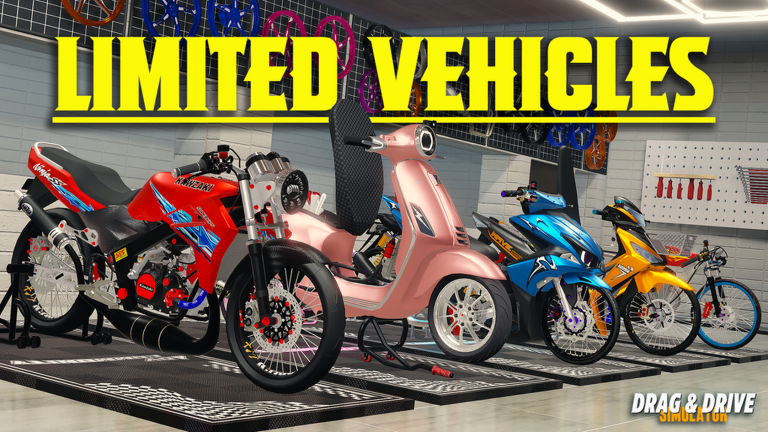
Always check the latest official Roblox game page to see which vehicles are currently featured in the Limited Special category. These vehicles often come with pre-tuned stats that are better suited for the current map version than older, standard models.
Common Exploration Mistakes to Avoid
Many players fail to progress because they ignore the modification system. You don't need to be a professional mechanic to improve your car, but neglecting your rims, materials, and accessories will leave you at a disadvantage during races.
Another common error is relying solely on outdated map guides. Since the game receives frequent updates—such as the recent September 2026 content drop—a guide written even six months ago might miss critical shortcuts or new zones. Always prioritize information that references the latest version number, currently BETA V1.1.9.
Troubleshooting Exploration Issues
Stuck on loading? Check your server region in the settings.
Cannot find the new area? Ensure you are not in a private server that hasn't been updated to the latest version.
Missing codes? Redeem them through the Shop menu's "Redeem" option so the reward registers on your account.
Frequently Asked Questions (FAQ)
What is the best way to explore the Drag Drive Simulator map?
The best approach is to start with the main city hubs and gradually move toward the outskirts. Using a motorcycle provides the best maneuverability to discover the hidden anomaly locations scattered throughout the drag drive simulator map.
Are there secret locations on the map?
Yes, there are several hidden spots, often referred to as "anomaly locations." These are typically marked by unique environmental assets like statues or specific signs that you must navigate to by following precise directions from the spawn point.
How do I access the new Surakarta City expansion?
You can access the expansion by following the road signs leading to the Surakarta City zone. It is part of the latest update, so ensure your game is fully updated to version BETA V1.1.9 to see all the new content, including Gatsu Street.
Does the map layout change with every update?
While the core map remains, developers frequently add new zones, expansion areas, and secret spots. Keeping an eye on official game updates is the best way to stay informed about changes to the drag drive simulator map.