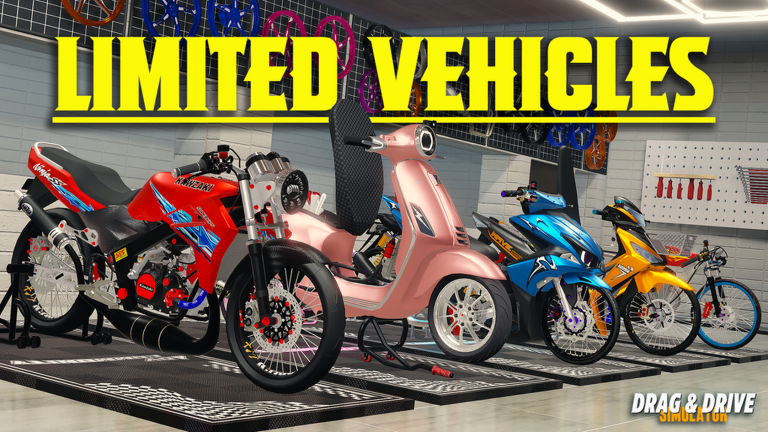
Ready to turn your ride into a street-legal beast? Understanding the Drag Drive Simulator modification garage is the first step toward dominating the leaderboard and mastering the latest update. Whether you are a beginner looking to improve performance or a seasoned pro tweaking your custom rims, this guide covers everything you need to know to stay ahead of the competition.
Why Modification Matters in Drag Drive Simulator
In the high-stakes world of Drag Drive Simulator, your vehicle's performance isn't just about speed; it's about precision. As the community constantly explores the new mechanics introduced in the latest Roblox update, customization has become the core of the experience. Modifications allow you to push your engine to its limits and fine-tune your handling for those tricky wheelie challenges.
When you invest time in the Drag Drive Simulator modification garage, you aren't just changing aesthetics. You are optimizing your bike for specific events, such as the Gatsu Street races or high-speed drag competitions. Understanding which parts affect your acceleration and stability is essential for any player aiming for the top tier.
Step-by-Step: Changing Your Exhaust Pipe
One of the most frequently asked questions in the community is how to modify the exhaust pipe to change the sound and performance of the bike. According to experienced players, the process involves navigating the internal engine menus.
| Step | Action | Description |
|---|---|---|
| 1 | Enter Garage | Drive your vehicle into the modification shop. |
| 2 | Select Engine | Navigate to the 'Engine' menu in the UI. |
| 3 | Engine Internals | Locate the internal parts section. |
| 4 | Adjust Tuning | Cycle through available stages to hear the exhaust change. |
Community Tip: Many players report that cycling through the pipe settings three times can sometimes reset specific glitches, ensuring your sound customization saves correctly. Always verify your build by testing it on the track immediately after modifications.
Understanding the Modification System
The latest update has overhauled how vehicles work, introducing new categories for rims, materials, and accessories. These changes have a significant impact on your ride's weight and handling profile.
Key Modification Categories
- Engine Internals: Directly influences your acceleration and top speed.
- Wide Rims & Tires: Affects your grip, crucial for performing stable, long-distance wheelies.
- Accessories: Mostly aesthetic, though some help with the game's roleplay immersion.
- Material Customization: Allows for unique visual finishes on your bike parts.
Tip
Performance Optimization Always prioritize 'Engine Internals' before cosmetic accessories if you are short on cash. Better engine stages provide a much higher return on investment for winning races.
Advanced Tuning: Wheelie Style and Handling
With the introduction of the Special Trick System, handling is more important than ever. If you are struggling with the one-minute wheelie challenge, your modification settings might be the culprit. A bike that is too light or has the wrong rim type will struggle to maintain balance at high speeds.
| Component | Benefit to Wheelies | Recommended Type |
|---|---|---|
| Tires | Increased Traction | Drag Racing Slicks |
| Suspension | Improved Balance | Stiff / Sport Tuning |
| Engine | Consistent Power | Stage 3 Internal |
Players who have mastered the "Handstand" wheelie style often recommend upgrading your suspension alongside your engine internals to ensure that the power delivery is smooth enough to keep the front wheel up without flipping the bike.
Avoiding Common Modification Mistakes
Even veterans make mistakes in the garage. One of the most common issues is neglecting the balance between visual weight and engine power. Installing too many heavy accessories can significantly hamper your bike’s performance in a race.
- Don't Over-Mod: Adding every accessory can increase drag and decrease your acceleration.
- Testing is Mandatory: Every time you alter your engine internal settings, take your bike to a test track to ensure the handling profile still suits your driving style.
- Watch the Updates: Developers frequently tweak vehicle stats. If your bike suddenly feels slow, check the community discord or the in-game update log for patch notes on performance.
Frequently Asked Questions
Q: Where can I find the Drag Drive Simulator modification garage? A: The modification shop is located on the main map. You can follow the primary roads from the dealership area, looking for the dedicated workshop signs on the right side of the street.
Q: How do I make my bike faster using modifications? A: To increase speed, focus on the 'Engine Internals' section. Upgrading these parts will provide the most significant boost to your performance.
Q: Do cosmetic mods affect how the bike handles? A: While mostly for style, certain heavy accessories can slightly alter your vehicle's center of gravity. Always test your bike after making major visual changes to ensure it still rides well.
Q: Can I save my modification presets? A: Currently, you must manually select and adjust your parts. Keep an eye on future updates as the developer is always adding quality-of-life improvements like a 'Favorite Vehicle Spawner' system.