Struggling with your vehicle? Discover the essential Drag Drive Simulator controls, expert driving tips, and camera tricks to dominate the track today.
Published: Drag Drive Simulator Wiki Editorial Team
Table of Contents
Whether you are a newcomer looking to earn your first million in RP or a seasoned rider aiming to perfect your wheelie style, understanding the mechanics of this game is vital. Mastering drag drive simulator controls is the first step toward becoming a top-tier racer in this high-octane Roblox experience. By learning how to handle your bike with precision, you can turn every race into a victory and climb the leaderboard faster than your rivals.
In this comprehensive guide, we will break down everything you need to know about the game’s interface, vehicle handling, and hidden camera features. If you want to leave your competition in the dust and show off your custom builds, focusing on these drag drive simulator controls will give you the competitive edge you need to succeed in the virtual streets of Surakarta.
Understanding the Basics: Navigation and Driving
At its core, the game is a vehicle simulation that rewards precision and timing. While the interface might seem straightforward, the physics of each motorbike and car vary significantly. To get started, you must be comfortable with the primary movement inputs that allow you to navigate the open world and the race circuits effectively.
Primary Input Reference
The following table outlines the essential keyboard inputs required to operate your vehicle in the standard game environment.
Action
Control Key
Purpose
Accelerate/Forward
W
Move your vehicle forward
Brake/Reverse
S
Stop or back up your vehicle
Steer Left
A
Turn the vehicle left
Steer Right
D
Turn the vehicle right
Interaction
E
Use menus, shops, or interact with NPCs
Jump
Spacebar
Dismount or jump off the bike
Headlights
L
Toggle lights on/off
Parking Brake
P
Lock the vehicle in place
According to player experience shared within the community, these inputs are designed to be intuitive, but the handling feel changes based on the vehicle’s stats. If you find your vehicle stuck after a collision, the community recommends using the exit icon on your screen to reset your position immediately.
Mastering the Camera: Free Cam for Cinematic Shots
One of the most impressive features of the game is the ability to capture high-quality footage. If you are a content creator or simply want to show off your latest bike modification, knowing how to use the camera system is just as important as knowing the drag drive simulator controls.
How to Activate Free Cam
To enter the cinematic mode on PC, join a server and press Shift + L. This will detach your camera from your avatar, allowing you to fly around the map. To return to normal view, simply press the same combination again.
Camera Movement Mechanics
Once you are in free cam mode, use the following controls to adjust your angle:
W/S/A/D: Move the camera forward, backward, left, and right.
Q: Move the camera downward.
E: Move the camera upward.
Mouse: Rotate the camera to focus on your target.
Shift: Hold to increase movement speed for quick repositioning.
Tip
Cinematic Quality
Avoid jerky mouse movements. Slow, sweeping pans make your race highlights look much more professional for platforms like YouTube or TikTok.
Advanced Gameplay: Wheelies and Racing Tactics
The recent "Wheelie Style" update has completely changed how players approach racing. It is no longer just about raw speed; it is about style and control. Mastering the wheelie mechanics will earn you special badges and significant cash bonuses, which are essential for upgrading your vehicle slots.
Wheelie Performance Tiers
The game features multiple wheelie styles that require different levels of skill. Here is a breakdown of how these rewards function:
Achievement
Requirement
Reward
One-Minute Wheelie
Hold a wheelie for 60 seconds
Special Riding Badge
Professional Freestyler
Handstand wheelie on 10 bikes
25M Cash Bonus
Style Tuning
Adjust angle/speed in menu
Improved control stability
To perform these moves effectively, ensure you are testing your bikes on the main straightaway before entering a competitive tournament. As noted in recent community reports, the "Center Circuit" is the best place to practice these maneuvers without the pressure of a live race.
How to Maximize Your RP Earnings
RP is the primary currency used to purchase new vehicles and accessories. If you are struggling to afford the high-end motorbikes, consider diversifying your income streams beyond just winning races.
Income Strategy Comparison
Job/Activity
Effort Level
Payout Potential
Courier Deliveries
Low
Consistent/Steady
Office Worker
Medium
High (with 2X Gamepass)
Tournament Drag Race
High
Variable (Winner takes all)
Time Trial
Medium
Distance-based payout
For those looking to optimize their time, the Office Worker role is highly recommended. By sitting at a computer and performing basic arithmetic tasks, you can accumulate funds quickly. If you want to increase these earnings, purchasing the "2X Paycheck" gamepass is the most efficient way to scale your wealth early in the game.
Customization: Making Your Ride Unique
Beyond the drag drive simulator controls, the game offers a deep customization system. You can modify your rims, materials, and accessories to ensure your ride stands out. Visit the official Roblox game page to see the latest community-voted features and new vehicle releases.
Warning
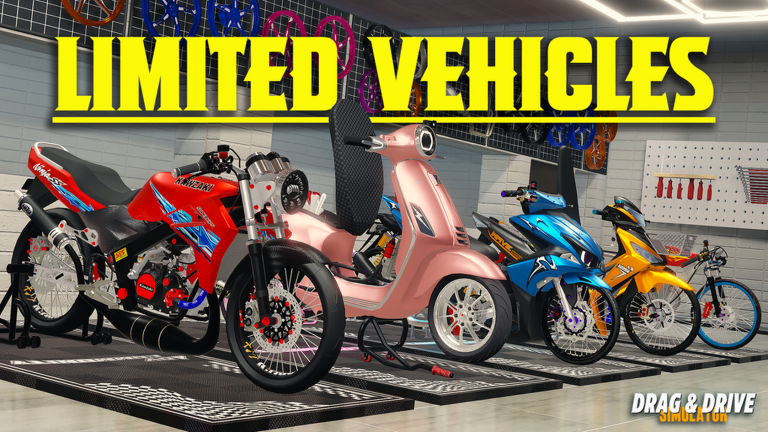
Limited Vehicles
Keep an eye on the Dealership for limited-time vehicles. These bikes often have superior base stats compared to standard models, making them worth the investment if you have the RP saved up.
FAQ: Frequently Asked Questions
Q: Are the drag drive simulator controls different on mobile devices?
A: Yes, mobile players use on-screen touch inputs. While the layout is simplified for touchscreens, the fundamental physics remain the same. It is often considered easier to drive on mobile for beginners.
Q: How do I get the Police role?
A: You can obtain the police role by purchasing the Police Pass from the in-game Store for 149 Robux. This role provides unique gameplay opportunities not available to civilians.
Q: Why is my vehicle handling so poorly?
A: Handling is heavily dependent on your bike's specific stats and your current customization. Ensure your tires and rims are upgraded, and practice your throttle control—don't just hold 'W' down; feather the input for better traction.
Q: Where can I find new redeem codes?
A: Codes are frequently released by the developers on the game's official social media pages or the game description section on Roblox. Keep an eye out for updates, as they often drop when reaching new "Like" milestones.