Complete Guide to Drag Drive Simulator Gamepasses & Perks
Discover all about Drag Drive Simulator gamepasses. Learn how to maximize your gameplay, unlock exclusive perks, and boost your racing performance today.
Published: Drag Drive Simulator Wiki Editorial Team
Table of Contents
Drag Drive Simulator has quickly become one of the most immersive vehicle roleplay experiences on Roblox, challenging players to master the art of the wheelie and high-speed drag racing. If you are looking to elevate your status on the streets, understanding the various Drag Drive Simulator gamepasses is the first step toward dominating the leaderboard.
Whether you are a casual cruiser or a competitive racer, investing in the right tools can drastically change your experience. From unlocking exclusive vehicles to doubling your in-game income, these premium upgrades are designed to streamline your progression. In this guide, we will break down exactly how these passes work and which ones provide the best value for your hard-earned Robux.
Understanding the Value of Drag Drive Simulator Gamepasses
Many new players often ask why they should consider purchasing extras when the base game is already so comprehensive. The answer lies in efficiency. In a game where customization and performance are key, Drag Drive Simulator gamepasses act as accelerators for your journey.
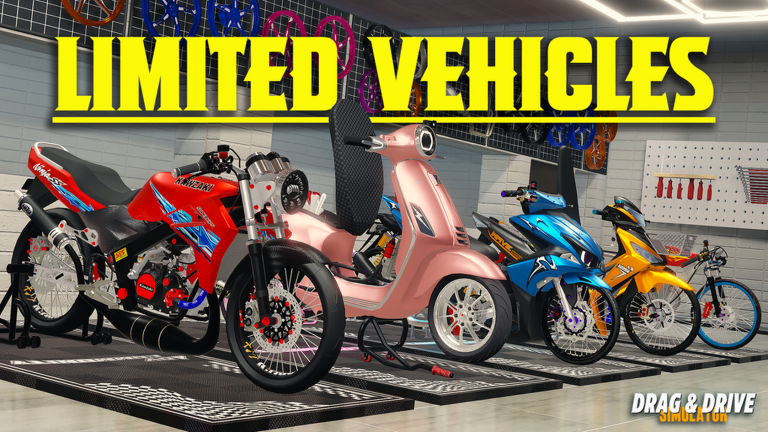
Rather than spending hours grinding for standard cash to unlock basic modifications, certain passes allow you to bypass the early-game struggle. For instance, if your goal is to build a high-performance bike fleet, specific passes provide direct access to advanced dealer options that are otherwise locked.
Top Tier Gamepasses Overview
The following table summarizes some of the most popular upgrades currently available in the game store:
Gamepass Name
Primary Benefit
Recommended For
DragSpec Pass
Unlocks specialized drag bike dealer
Serious racers
2x Paycheck
Doubles your income from jobs
Efficient grinders
Police Pass
Access to police role and gear
Roleplay enthusiasts
Luxury Pass
Access to premium vehicle tiers
Collectors
Custom Plate Pass
Personalize your vehicle identity
Social players
How to Acquire and Equip Your Passes
Navigating the store interface is straightforward, but it can be confusing for those new to the platform. To access the shop, look for the icon in the left corner of your screen while in-game. Once opened, you can scroll through the available list of upgrades.
Open the Shop: Click the 'Shop' button located on the left-hand side of your UI.
Browse Categories: Review the available passes, including performance-based items and cosmetic upgrades.
Confirm Transaction: Select your desired pass and confirm the Robux deduction.
Activation: Most passes activate automatically upon purchase. If you face an error, try re-joining the server to refresh your inventory permissions.
Tip
Check for Server Updates
Always keep an eye on the official game menu. The developers frequently release new codes (like the recent September updates) that can grant free cash, which helps you save Robux for the more expensive, permanent gamepasses.
Deep Dive: Performance vs. Cosmetic Upgrades
When choosing between the many available options, it is important to categorize your priorities. Are you looking to climb the ranks, or are you here to explore the map of Surakarta in style?
Performance-Boosting Passes
For players focused on the "Wheelie Style" mechanic and racing times, the DragSpec Pass is essential. It provides access to specialized bikes that are tuned for high-angle maneuvers. According to community reports, players who utilize this pass find it significantly easier to complete the one-minute wheelie challenge and unlock high-tier rewards.
Economic Advantages
The 2x Paycheck pass is perhaps the most underrated investment. If you spend a lot of time engaging in the game's roleplay economy, this pass essentially cuts your "time-to-purchase" for new vehicles in half. It is a long-term investment that pays for itself after a few gaming sessions.
Category
Impact Level
Strategy
Racing
High
Prioritize DragSpec and Suspension Pro
Roleplay
Medium
Prioritize Police and Luxury passes
Progression
Very High
Prioritize 2x Paycheck
Troubleshooting Common Issues
Even with premium purchases, you might occasionally encounter bugs or errors. A common issue reported by players is the "Error occurred" message when trying to access specific bike dealers despite owning a pass.
Re-join the Server: Most permission-based issues are resolved by simply leaving and entering a new server.
Check Inventory: Ensure the item is actually showing as "Owned" in the store menu.
Role Requirements: Some passes, like the Police Pass, require you to manually switch your class in the menu before you can access the specialized vehicle spawn points.
Maximizing Your Gameplay Experience
Beyond just buying passes, you can pair them with the game's new modification system. For example, using the Exclusive Rims Pass alongside the new "Wide Rims Type" customization allows you to create a one-of-a-kind vehicle that stands out in the lobby.
Community members often suggest that players focus on one "role" at a time. If you choose to be a police officer, focus on your police-themed upgrades first to maximize your roleplay potential before branching out into the racing scene.
Recommended Progression Path
Early Game: Buy 2x Paycheck to build capital.
Mid Game: Acquire DragSpec Pass to start participating in competitive drag events.
Late Game: Invest in Luxury Pass and Premium Accessories to customize your dream garage.
Frequently Asked Questions (FAQ)
Q: Do I need to buy Drag Drive Simulator gamepasses to win races?
A: While you don't need them to win, they provide a significant competitive edge by unlocking superior bikes and specialized tuning options that standard players cannot access.
Q: Can I trade my gamepasses with other players?
A: No, gamepasses are tied to your specific Roblox account and cannot be traded or gifted once activated. Always ensure you are purchasing them from the official in-game store.
Q: What is the best gamepass for a beginner?
A: We recommend the 2x Paycheck pass. It is the most versatile upgrade, helping you earn money faster for any vehicle or customization you choose to pursue later.
Q: Where can I report a problem with my purchase?
A: If a pass is not appearing, check the social links provided on the official Drag Drive Simulator game page to report the bug to the ADV Gamers Team.